Repository navigation
Expander Regression/Bugs #1630
Description
I'm submitting a...
[x] Regression (a behavior that used to work and stopped working in a new release)
[x] Bug report  <!-- Please search GitHub for a similar issue or PR before submitting -->
[ ] Feature request <!-- Please file a UserVoice request and include the link below https://wpdev.uservoice.com/forums/110705-universal-windows-platform/category/193402-uwp-community-toolkit -->
[x] Sample app request
[ ] Documentation issue or request
[ ] Question of Support request => Please do not submit support request here, instead see https://github.com/Microsoft/UWPCommunityToolkit/blob/master/contributing.md#question
Have 4 issues with updates to Expander Controls from 2.0 to now:
-
Regression: Expander Background is Stretching in Right/Left mode.
Current Incorrect Behavior (with same XAML as original sample app):
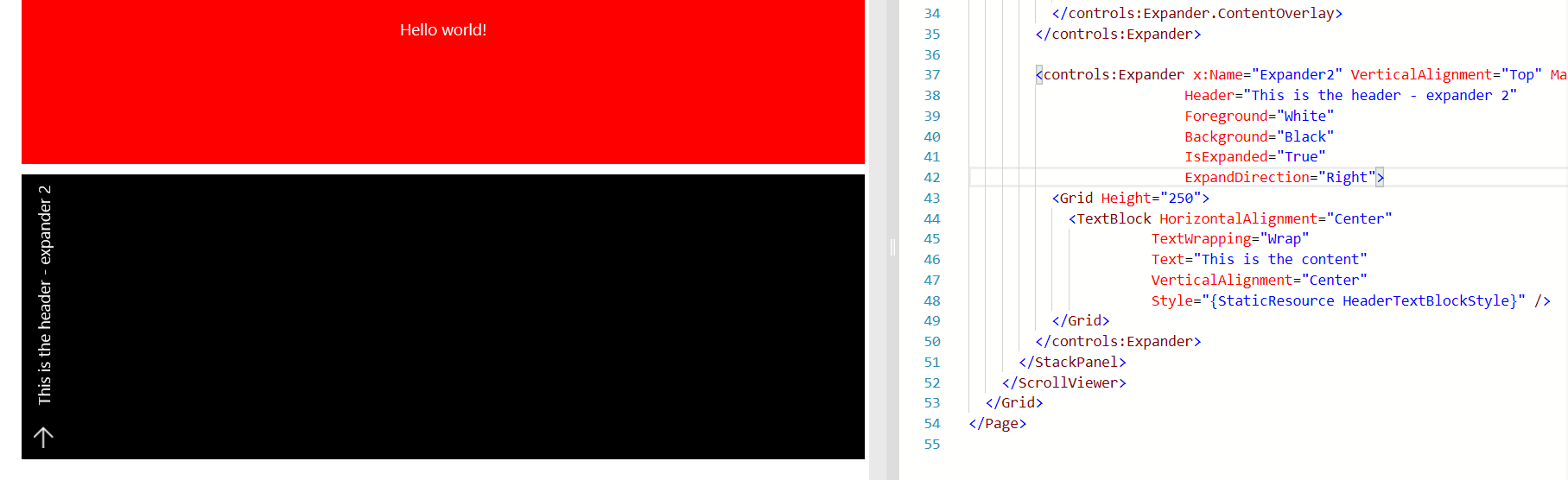
- We should keep the XAML the same for that 2nd example in the sample app too (it has two extra properties currently).
2.0 Expected Behavior:

-
Not sure if just in Sample App, but hovering over collapsed expander makes text disappear:
Current behavior:

Expected Behavior (text visible):

-
Animations are playing on control creation.
Current behavior: Animations for the 'expansion' reaction for the expander content or the content overlay content play when the control is created.
Expected behavior: Animations only play when user expands/collapses the control through interaction.
-
Sample App/Doc Question:
Is it possible to customize the hide/show animations for the expansion/content overlay. I'm not a fan of the content overlay expanding from the bottom, so it'd be nice if the sample showed how to disable/change them, especially now with the new implicit animation helpers.
Minimal reproduction of the problem with instructions
Compare Expander Sample in Released Store Sample App compared to one built from master.
Environment
Windows 10 Build Number:
- Anniversary Update (14393)
- Creators Update (15063)
- Fall Creators Update (16299)
- Insider Build (xxxxx)
Device form factor:
- Desktop
- Mobile
- Xbox
- Surface Hub
- IoT
Visual Studio
- 2017 15.3
- 2017 15.4
Activity
Odonno commentedon Nov 16, 2017
Great catch. The background should not be visible IsExpanded="False" and ExpandDirection="Right | Left"
It is because of the change on the Background property. I remember it was moved to another Panel. Why not adding a new property to handle
CollapsedForegroundcolor on collapsed state?Should it be for universal? Or should we make a new property
FirstPlayAnimation?I would really like to replace some (why not all) of the animations with Composition API. @nmetulev do you think it is feasible to replace every animation with your implicit animation helpers and letting devs being able to update them?
nmetulev commentedon Nov 16, 2017
On the animations, absolutely, we can replace the animations in the default template with the new implicit animations.
nmetulev commentedon Nov 18, 2017
I created a pull request to address this. @michael-hawker @Odonno, please review asap, it will need to be merged by Monday to make sure we have the fix for 2.1.
Notably, I removed the DisplayMode property as that seemed to be causing few issues and allowed me to simplify the template. Interestingly, I think the control works well without it. If there is ContentOverlay it will be in Overlay mode, otherwise it will be in Expand mode. Let me know what you think