A CFD agent with a real OpenFOAM workspace.
OpenReynolds is a tool-use loop with nine tools pointed at a Linux machine that has OpenFOAM v2512 on it. You describe the flow; it writes the case, meshes it, launches the solver, reads the residuals while they come in, looks at its own renders, and hands back the figures and the files that made them.
There is no pipeline underneath choosing the order of those things. The agent decides how to work. This repository is the plumbing that lets it, and the plumbing is deliberately not allowed to tell it what to do.
tryreynolds.com · Documentation · Worked studies · Hosted app · PyPI
You do not need to know OpenFOAM to use it. You bring the engineering question: the geometry, the fluid, the speed, and what you want measured. Choosing the solver, writing the dictionaries, sizing the mesh and reading the residuals is the agent's job.
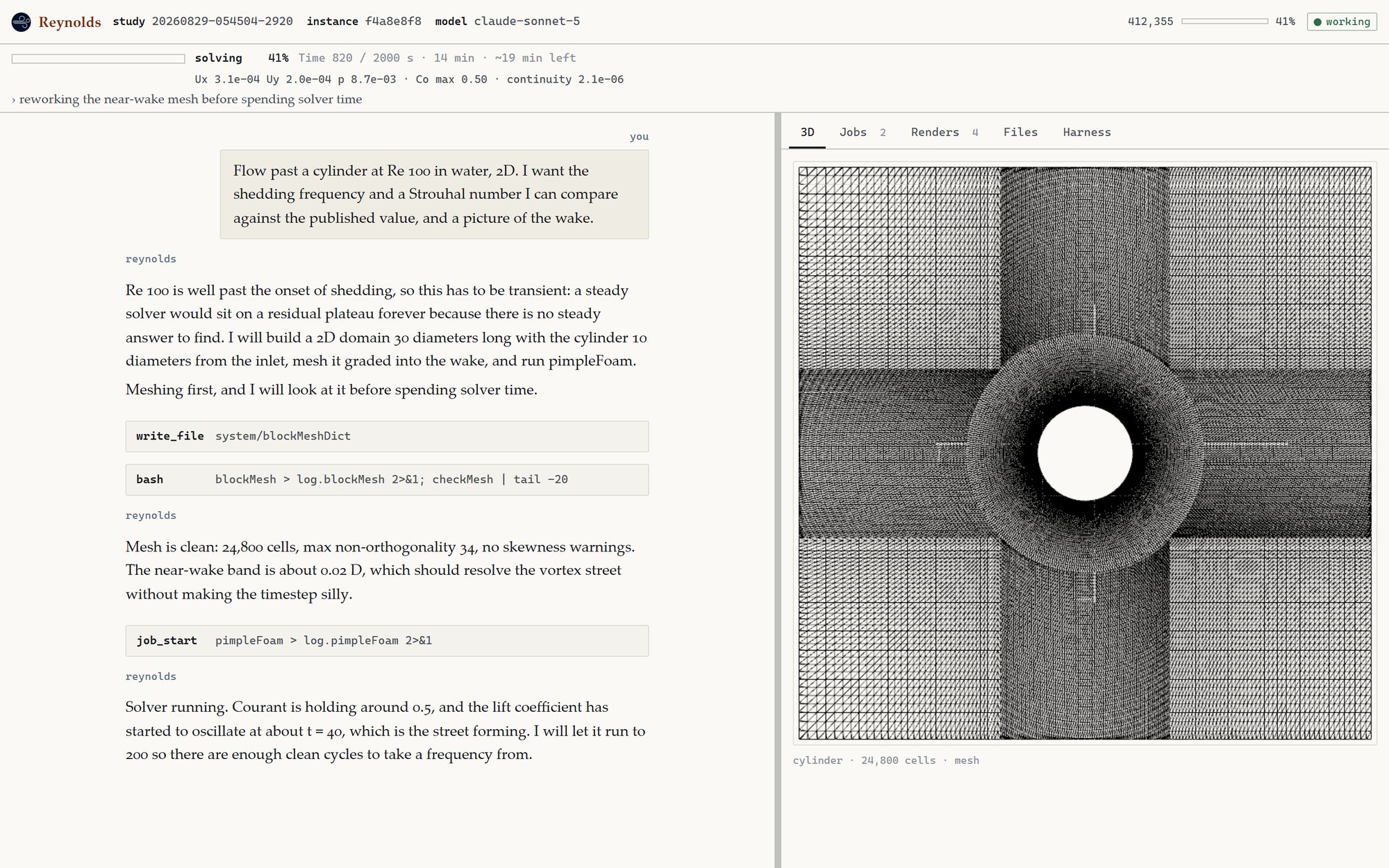


A study in progress. What the agent says is on the left, what it did to the workspace is underneath, and what it built is on the right. The bar across the top is the solver's own numbers, read out of the log while the job runs.
Every one of these is from a real run, with its transcript published beside it at tryreynolds.com/studies.
 |
 |
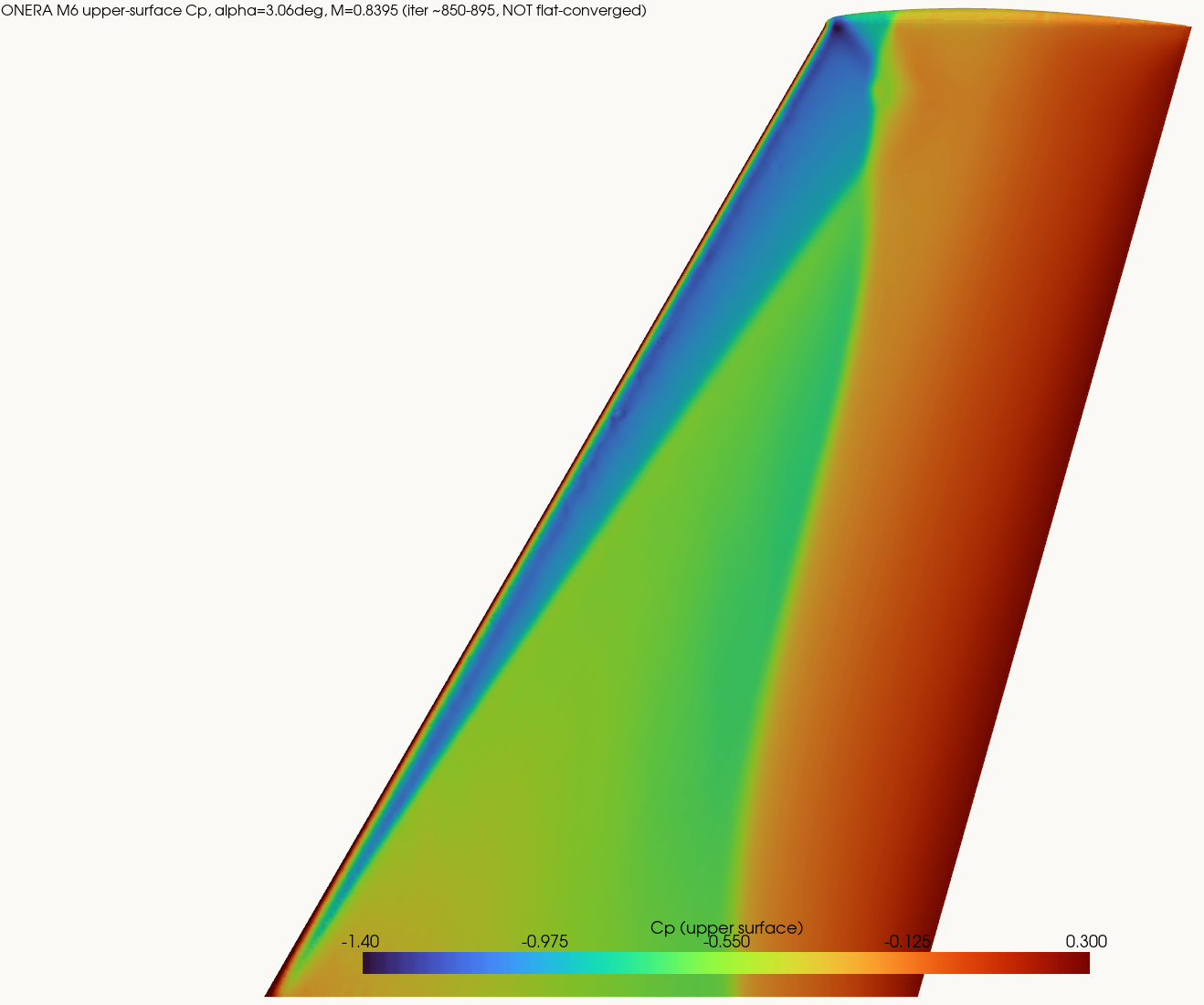
| The lambda-shock, at one seventh the mesh ONERA M6 at Mach 0.8395. Shock positions within 0.06 chord of the 1979 wind-tunnel data, on 1.79 million cells. |
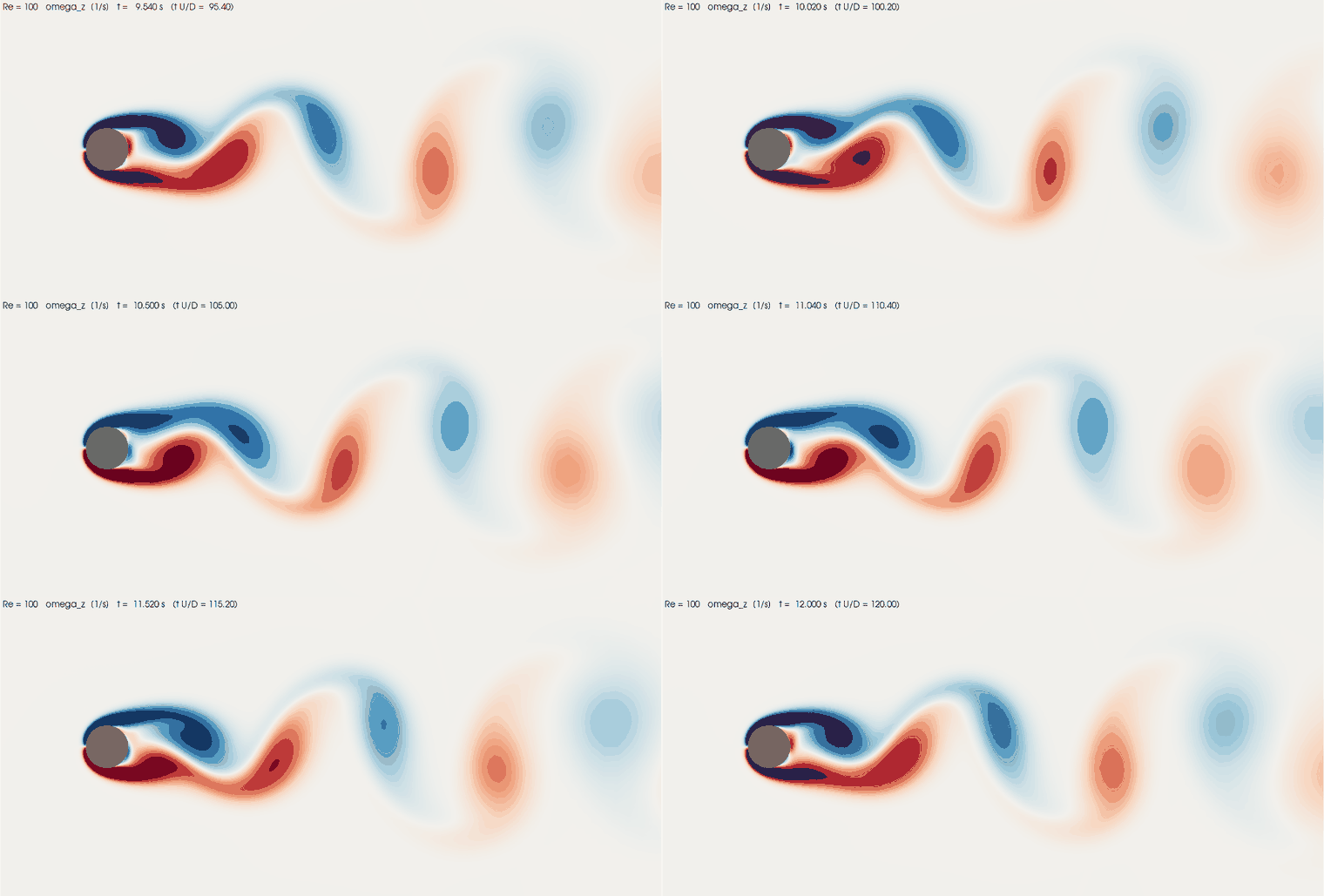
Four numbers, four published bands, one animation Vortex shedding at Re = 100, with the Strouhal number checked against the published band. |
 |
 |
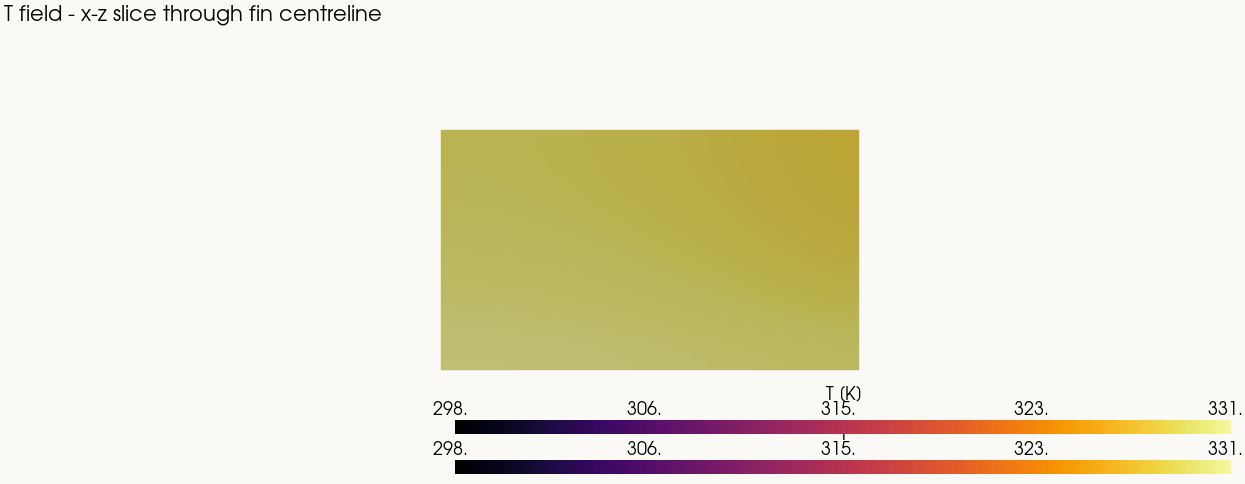
| A heat sink, and an energy balance closed to 99.7% Conjugate heat transfer, with the energy balance closed as its own check. |
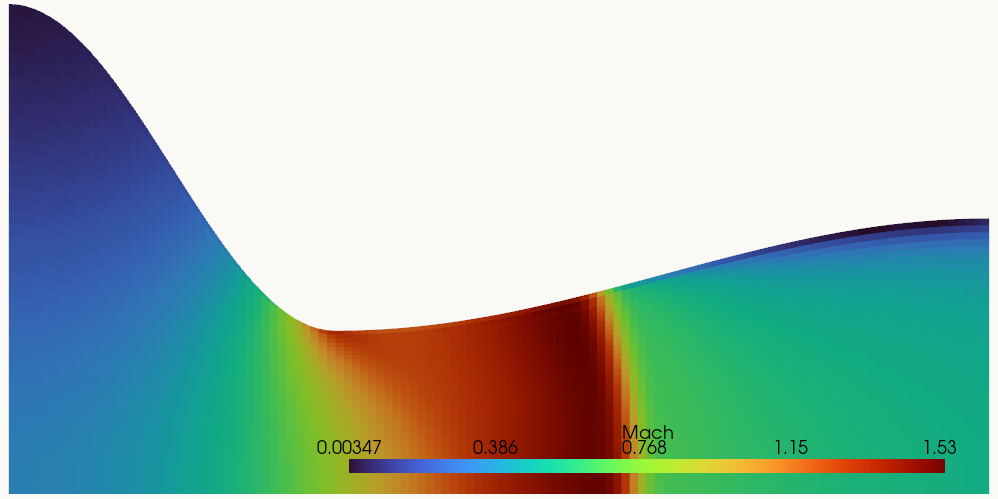
The solver said it had converged. The agent checked. A nozzle designed for Mach 2, run overexpanded, and the disagreement caught. |
pip install openreynolds     # or: uvx openreynolds · pipx install openreynolds · npm i -g openreynolds
openreynolds login           # email and password, or --browser for Google; the app.tryreynolds.com account
openreynolds config          # optional: your own model key, any vendor, instead of Reynolds' model
openreynolds doctor          # check it can all be reached, before spending anything
openreynolds                 # start a study
login hands this machine its own service key, stored outside the repository, and
offers to create an account if there is none. --browser approves a short code in a
browser instead: that is the way in for a terminal with no keyboard of its own, and the
only way in for an account created with Google, which has no password to type. A
password sign-in for one of those fails exactly like a wrong password, and the service
cannot tell the two apart, so the terminal names the browser flow whenever a sign-in
fails rather than offering to create a second account for an address that already has
one.
With no model of its own (no provider, endpoint or key of any vendor in the config file
or the environment), a machine that signs in uses Reynolds' model, metered to the account.
openreynolds config --provider anthropic (or another vendor) switches it to a key of
your own. While the browser code waits for approval, a gateway error or a dropped
connection is waited through; only a refusal or the code expiring ends it.
--native runs the workspace here rather than in a container: no Docker, no image to
pull, no sandbox. With the toolbox extra it solves without OpenFOAM at all, because
several of the toolbox's scripts are solvers in numpy rather than wrappers around
one. Tier 1 of the tutorial index is the list --
every case that needs nothing installed, with the reference it is measured against
and the agreement a run really got -- and run_tier1.py runs all of them at once.
pip install 'openreynolds[toolbox]'
openreynolds --native doctor      # the local-solvers check passes with a caveat, not a FAIL
openreynolds --native
doctor reports local solvers as present-with-a-caveat rather than as a failure, because
a machine that can solve a cavity should not be told it cannot run. Measured on a machine
with no OpenFOAM, that check reads ok local solvers (native) and names what will fail
without it. The other checks are unchanged, so doctor still fails on a missing model
key or an unreachable service: it is this one check that stops being a FAIL. What OpenFOAM is
installed, if any, is used as it is (OPENREYNOLDS_FOAM_BASHRC names it when it is not
found), and the agent is written for ESI v2512.
A local study still reaches the service. Signed in, the transcript, the figures and
the case files are mirrored and posted exactly as a hosted one's are, so the study is on
the web afterwards and openreynolds --study <id> resumes it from either side. Measured
on a Windows laptop with no OpenFOAM and no Docker: a study that solved the lid-driven
cavity at Re 1000 against Ghia's tables put 23 of 23 messages and both figures into the
service. openreynolds capture --study <id> posts anything a dropped connection left
behind, and --dry-run names the gap without sending it.
The account is still what pays for the model: with no provider of your own, a signed-in
machine uses Reynolds' metered model, and openreynolds config --provider anthropic (or
another vendor) switches to your own key. The solving is local either way.
A company email address starts a 30-day Pro trial with 15 full-depth studies, covering the hosted workspace and Reynolds' own metered model together; a personal address starts a 30-day Starter trial with 5. Both take a card and renew unless you cancel. Which addresses count is the service's rule and is never guessed at here, because a domain list copied into a client goes stale and starts telling people the opposite of what they are about to get.
Run doctor first. It checks settings, the workspace service, the model API,
capture, sharing, the toolbox, the terminal and the video encoder, and on the service's
workspace it writes nothing. Almost every confusing first session is one of those being wrong, and doctor
says which in a sentence.
 study 20260823-213712-babc   instance 974f4406   model claude-opus-5
 412,355 tokens  (41% of the window)
 ██████████░░░░░░░░░░░░░░  41%  solving miter_medium · Time 820 / 2000 s · 14 min · ~19 min left
                                Ux 3.1e-04  Uy 2.0e-04  p 8.7e-03 · Co max 0.50 · continuity 2.1e-06
 thinking 12s: the residual plateau at 1e-4 is the mesh, not the solver
+------------------------------------------------------+ running
| I'll build a mitred 90 degree elbow, 100mm square.    |   * miter_medium
| Starting with the coarse rung so the ladder is cheap. |
|                                                       | jobs keep running
+------------------------------------------------------+ if you leave
+------------------------------------------------------+
| job_start   ./run_case.sh miter_medium                |
| watching 1 job(s) - type to interrupt                 |
+------------------------------------------------------+
  Ask for something, or say what looks wrong...
A session has four things worth watching at once, and a single scrolling log shows one of them while burying the rest. So what the agent says gets the main pane, what it does goes to its own activity pane, what is still running out on the instance — the part that outlives the session — gets a panel that says so, and what is in the workspace gets a file tree you can open things from.
--plain gives a plain streaming terminal instead, which is what you want in CI or
over a poor connection.
That is the whole surface. Anything the agent does to a case, it does through one of these.
| Tool | What it does |
|---|---|
bash |
Run a command with the OpenFOAM environment already sourced. Capped in output and in time, so a runaway command cannot fill the context. |
write_file |
Write a file. Every blockMeshDict, fvSchemes and boundary condition arrives this way. |
read_file |
Read a file back. Reading a PNG is how the agent looks at its own geometry and mesh renders, which is why the model has to be one that can see. |
job_start |
Launch a detached job: a mesh, a solve, a post-process. It outlives the call that started it, so an hours-long run is not held open by a request. |
job_check |
Ask how a job is doing. It can hold the answer until the job ends, and returns early the moment you type. |
job_kill |
Stop a job, and confirm it actually stopped. |
fetch |
Copy files or directories out of the workspace onto your own machine, and say where they landed. Renders and reports come home this way. |
cad |
Describe a shape in words — or point at a .step/.iges file already on the workspace — and get back an OpenFOAM mesh of it there. A separate agent does the work on the same machine, one python cell at a time in a kernel: it builds or imports the shape, repairs and tags it, picks the mesher (snappyHexMesh, cfMesh, gmsh body-fitted, blockMesh), renders the mesh, measures it, and revises until checkMesh passes and the shape measures up to what was asked for. Saying it is done is not what ends it — the mesh has to be there, pass, carry patch names somebody chose, and have a script that rebuilds it. You get the picture, the patch table, checkMesh's verdict, the script and where the case is. A mesh only: fields, boundary conditions and the solve stay with the agent. |
mesh_review |
Have an independent reviewer look at a mesh that already exists — one built with bash, one the cad tool returned, one you uploaded — from several views (2D: overview, cells, zoomed quadrants; 3D: isometric corners, orthographic faces, mid-plane cuts) and say whether it is the shape that was asked for. A fresh model that did not build it and has not seen the conversation, judging the pictures against the request: it fails only for what would change the CFD answer, does not run checkMesh and changes nothing. The cad desk consults the same reviewer at its own finish. |
Two more are always in the list but are not the agent's working tools. checkpoint is
structured mode's (see Modes): there it puts a summary of where the study stands, and
what comes next, in front of you and waits for your answer; in the other modes it
answers that checkpoints belong to structured mode and asks you nothing. The list never
changes with the mode, because a list that changed mid-conversation would break the
model's thread. send_to_agent belongs to the side chat (/btw).
The harness may cap tool output, keep the toolbox in sync, poll a running job in plain code and wake the model with the facts, and capture a transcript.
It may not enforce an order of work, block or rewrite a tool call, require an approval, inject a checklist or a workflow, or grade the output.
That holds in the default mode, full auto, exactly as written. The one exception is
yours to make: you can choose to be asked before compute is spent, or to run a study
in stages you approve (see Modes). The harness then gates exactly what you asked to
have gated and nothing else, for the same reason /btw exists: it is your say in how
you want to be heard, not the harness's opinion about how the model should work.
The rule that keeps the agent's view of the session stable: its system prompt and its
tool list never change mid-conversation. A study whose solver is left to choose has it
chosen from your first message, by a request of its own, before the agent's first turn
(desk.route), and the agent starts on that solver's prompt and tools.
That is not a convention anyone has to remember. tests/test_prompt.py fails the build
if imperative language appears in the system prompt, and tests/test_briefing.py
applies the same rule to the briefing, because a harness that starts telling the model
how to do CFD caps the work at whatever its author knew about CFD.
What the model gets instead is your standing preferences, relayed verbatim in your
own voice from preferences.md beside your config. Say you want the mesh rendered and
checked before any solver time is spent, and that is what the agent is told you want.
What it does about it is its call.
How much the agent does before it asks you. The mode never changes what the agent is told about CFD; it decides only whether compute waits for you.
| Mode | Label | What happens |
|---|---|---|
auto |
Full auto | The default. Nothing is held and nothing waits for you. The briefing is the same bytes it was before modes existed. |
partial |
Ask before compute | Every job_start call is put to you before it runs, since that is what spends compute. bash, read_file, write_file, fetch, job_check, job_kill and cad run freely. |
structured |
Structured | The agent gets a checkpoint tool that shows you a summary and what comes next and waits for your answer. job_start is held until you have approved a checkpoint, the plan. The stages are the guided pipeline's own: geometry, preview, mesh, checkMesh, probe, solve, reconstruct, render, animate, report. |
openreynolds --mode partial # or OPENREYNOLDS_MODE=partial, or "mode" in the config fileAnswer a question with /yes, /no <reason> or /all. Typing y or yes approves;
any other words decline and go back to the agent as your reason, verbatim. /all
approves and switches the session to full auto for the rest of it. /mode <name>
switches mid-session from the next tool call, and the agent is told. A resumed study
keeps its mode unless you give one. -p with a mode other than auto is refused with
exit code 2, because nobody is there to answer.
docs/modes.md has the whole of it.
Anything you type reaches the model at its next step, so you can steer a run without stopping it. These are answered by the harness instead:
| Command | What it does |
|---|---|
/btw <question> |
A side question: answered now from the agent's context, apart from the conversation, without interrupting it. |
/status |
What is happening right now, with no model turn. |
/files [path], /renders, /open |
Look at the workspace, the pictures, or the local folder. |
/mode [name] |
Show or switch the mode. |
/model [model] |
Show the provider, model and effort, or switch model. |
/effort [level] |
low, medium or high, from the next request. |
/yes, /no [reason], /all |
Answer an open question. |
/help [topic] |
Everything here; /help commands, modes, model, tools or keys goes deeper. |
/exit |
Leave. Jobs keep running. |
In the interface, typing / opens a list of matching commands above the prompt, with
the best match as grey text. Up and Down move, Tab takes the suggestion, Right takes the
grey text, Esc closes the list. After /mode , /model , /effort or /help the
list offers that command's choices. The hosted app's composer does the same from the
same registry. docs/session-commands.md has every alias and
key.
/model claude-opus-5            another model, same provider
/model anthropic:claude-opus-5  another provider, if its key is in the environment
/effort medium
A new model is probed, with an image, before it is accepted, so a typo or a text-only model is refused when you type it. It is applied between turns: typed while the agent is idle it answers your next message, typed mid-turn it takes over when the turn ends. Earlier thinking blocks are dropped from the thread, a thread too large for the new model's window (the one known for that model, otherwise the provider's) is refreshed first, and the prompt cache is written once more, so the first request after a switch costs more. Effort is read on every request and applies at once.
A switch outlives the session: session.json records the model, the provider that
served it and the endpoint it was served from, and --study <id> carries on on that
record, so a study moved to Opus for the hard part is still on Opus tomorrow. --model
or OPENREYNOLDS_MODEL still wins. Here the record is restored whenever the provider
that served it can be reached from this machine, switching provider if that is what the
record says and bringing that provider's key, endpoint, window and desk model with it;
on the provider this machine is already configured for, this run must also point at the
endpoint the model was served from, because a vendor's own key and a gateway in front
of it answer to different model ids. When the record cannot be honoured the session
says so in a line and runs on the configured model, and the study keeps what it
recorded, so a resume where the key is set carries on there.
Two limits. The record is the study's own session.json on this machine, so a study
resumed where it has never run (opened in the browser, or on another laptop) starts on
the configured model; nothing is fetched to stand in for it. And naming a provider is
not naming a model: only --model and OPENREYNOLDS_MODEL count as asking for one, so
OPENREYNOLDS_PROVIDER on its own does not hold a resume to that provider. A study
recorded before the provider was kept names a model and no provider, and starts on the
configured model as it always did: an id does not name a provider on its own, and
claude-opus-5 is valid on anthropic and on reynolds.
docs/switching-models.md has the detail.
The agent calls your provider directly with your key; the workspace service never sees it. Each preset carries an endpoint, a default model and a context window, so connecting is a key and nothing else. Anything speaking the Messages API or Chat Completions works even without a preset.
| Preset | Default model |
|---|---|
reynolds |
gpt-6.1-sol, metered through the workspace service, no key of your own (a Claude model works here too) |
anthropic |
claude-opus-5 |
openai |
gpt-5 |
openai-responses |
gpt-6.1-sol, through OpenAI's Responses API |
zai |
glm-4.6 |
deepseek |
deepseek-chat |
moonshot |
kimi-k2-thinking |
minimax |
MiniMax-M2 |
openrouter |
anthropic/claude-sonnet-4.5 |
ollama |
qwen3, on your own machine |
openreynolds config --provider anthropic    # a preset, then paste the key
openreynolds config --provider ollama       # local, no key
The model has to be able to see. The agent renders its geometry and its mesh and
looks at the images before spending solver time on them, so a text-only model works
blind. A key is refused at the point it is connected rather than halfway through a
paid study, and doctor makes the same check with a one-pixel image.
Two things are used at once: the model, charged per token by your provider when it is your own key, and the hosted workspace for as long as it is up. On a Reynolds plan, what a study uses of the workspace and of Reynolds' own model is counted against the plan's studies; a local workspace costs nothing but the model. Three things move the cost, and each was found the expensive way:
- Reasoning effort. The one knob that changes cost without changing what the agent may do.
- How often a long run wakes the model. Every wake re-sends the context, so a
chatty harness on a two-hour solve pays for the whole thread repeatedly.
OPENREYNOLDS_NARRATE_EVERY_Sis the control, and its default is generous. - Cores. Billed whether the solver scales to them or not. A small 2D case on four cores can be slower and dearer than the same case on one.
A workspace left running is still being used. It stops on its own when idle,
and openreynolds stop ends it now, verifying the jobs are actually dead rather than
assuming.
What a study spent is recorded on the study: the wall-clock time its sessions took and
the tokens they sent, by class, which openreynolds dashboard reports. Tokens and
time for every study, and a dollar figure only where your own key paid your own vendor
directly and that model's rate is known. A study on Reynolds' model is never priced in
dollars here: what it uses is counted against your plan's studies, which is also how
the service's own spending cap is reported (Modes, /status).
The durable thing is the volume, not the container: an instance can be stopped and started again with the case still on it. Stopping keeps the data.
A background mirror copies the study's directory down to your machine while the session runs, and fires immediately whenever the agent looks at an image, so a render you are about to be shown is already local. Remote deletions are not propagated home, which is deliberate: a local copy of something the agent cleaned up is a recovered file, not a bug. A session ending on a workspace the service has already stopped syncs from the service's own copy of it rather than starting a machine to be listed.
Rendering happens on the instance, beside the data, because moving gigabytes home to
make a hundred-kilobyte picture is the wrong way round. Frames come home and
openreynolds video assembles them here, where a real encoder lives. The instance
image has no encoder on purpose.
Once they are home, openreynolds view puts them on one page and opens it:
openreynolds view # the newest study, in your browser
The page links the pictures where they lie rather than embedding them, so it is a few
kilobytes whatever the study weighs, and it carries no script, no stylesheet and no
font -- nothing in it reaches the network. It shows what was rendered; it does not
rotate the mesh in the browser. For a page that can be attached to a message and
opened on a machine that has never seen the study, the gallery.py toolbox script
embeds every image instead.
--local puts the workspace on your computer instead of in the cloud. It runs in
Docker, in the same image the hosted workspace runs (OpenFOAM ESI v2512, cfMesh, the
toolbox's Python packages), so the agent sees exactly what it sees in the cloud: the
same /work, the same tools, the same version. Nothing is billed but your model.
# Docker Desktop on macOS or Windows, or Docker Engine on Linux, then:
openreynolds config --provider anthropic    # or any preset; ollama needs no key
openreynolds --local doctor                 # pulls the image, runs blockMesh in it
openreynolds --local- No account needed. A local workspace asks for a model key and nothing else. A
machine that is signed in still shares a trace of each local study (see Sharing);
openreynolds sharing offstops it. - Your files. The workspace is
~/.openreynolds/work(OPENREYNOLDS_LOCAL_WORKmoves it), mounted into the container as/work. Everything the agent writes is there, owned by you, and stays when the session ends. - Sandboxed. Commands run inside the container, as your user, with no network. They can reach the workspace directory and nothing else on your machine.
- Jobs outlive the session. A solve keeps running when you leave, the container
stays up for it, and
--study <id> --localpicks the study up again.docker rm -fon the container stops everything; the files are kept. - Felix is cloud-only. Its solves run on cloud GPUs, so a local study is OpenFOAM.
The image is ghcr.io/inviscidai/reynolds-workspace:2512, built from
docker/workspace: OpenFOAM ESI v2512, HiSA, gmsh,
build123d, pyvista and the rest of what the agent uses, the same image the hosted
workspace runs. Build your own with docker build -t my-workspace docker/workspace
and point OPENREYNOLDS_IMAGE=my-workspace at it. --native (or OPENREYNOLDS_LOCAL=native) runs the workspace on your machine as it is:
no Docker, no download, no sandbox. It uses whatever OpenFOAM is installed here
(OPENREYNOLDS_FOAM_BASHRC names it if it is not found), and the agent is written for
ESI v2512, so another version or fork will differ in places.
With no OpenFOAM at all, --native still solves (see On your own machine, with no OpenFOAM above for the short version), with one install:
pip install 'openreynolds[toolbox]'
lbm.py, sph.py, tracks.py and panel.py in the toolbox are a lattice-Boltzmann,
an SPH, a particle and a potential-flow solver written in numpy, so they need no
image and no OpenFOAM, and acoustics.py and wind_comfort.py are exact
instruments that need no solve at all; advise.py lists them beside the OpenFOAM
applications and marks which are actually here. The [toolbox] extra is what
puts numpy and the rest on your own machine, where the image would otherwise have
provided them -- a plain pip install openreynolds ships both solvers and nothing they
import, so they exit on ModuleNotFoundError: No module named 'numpy'. Measured on a
clean virtual environment, which is the only way to find that.
On a Windows laptop with neither OpenFOAM nor Docker, lbm.py poiseuille --n 32
converges in 4.1 s and matches the exact parabola to 9.7e-07 of the centreline speed.
Neither solver carries a turbulence model, both are 2D and explicit, so they are the
small end of the product rather than a replacement for it -- but they are the end that
runs anywhere.
Asking in words is right for "make the duct wider" and wrong for "that face is the
inlet": the second is quicker to point at than to describe, and a description is exactly
what the agent can misread. So the mesh tab in the
hosted app is an editor. Click the mesh and the smooth
surface under the pointer is picked, or one face, a patch, or a box; name it Inlet,
Outlet, Wall or Symmetry, with a flow direction and a speed per inlet. Sketch a 2D domain
in metres with bodies cut out and name its edges by clicking, and gmsh meshes it on the
instance with one curve per drawn edge, so a name lands on exactly the faces swept from
it. Move, scale and turn a mesh with the result shown before it applies. Every edit runs
createPatch and checkMesh on the same instance the session is using, keeps the mesh
it replaced so it can be undone, and refuses a page whose mesh changed underneath rather
than editing the wrong faces; handing it back tells the session what the patches now are.
None of this is in this package. It needs a pointer and a 3D view, so it lives in the
web app, and it is mentioned here because it changes the same workspace a CLI session is
working in.
New in 0.5.0, and optional. Nothing in the core install changes, and the core imports without it.
pip install 'openreynolds[live]'
A GPU fluid that steps in lockstep with Newton, so a policy trains against water and air that push back. It runs inside Isaac Sim, in a live Kit process, on Kit's own Warp build rather than a pinned one.
There are two solvers in here and they are not at the same level of trust, which is the first thing to know:
| lattice Boltzmann | SPH | |
|---|---|---|
| state | stable | beta |
| for | air, and water with no free surface — a drone, a submerged hull, an internal passage | liquid with a surface — a cup, pouring, a floating hull |
| select it with | the default, or backend="lbm" |
free_surface=True, or backend="sph" |
The lattice side is two-way coupled with no host round trips in the step loop, reaches
1,478 MLUPS on an H100, and passes its coupling and robot-demo suites outright. The SPH
side is what a cup of water on a robot arm needs; it is newer, and
RELEASE_NOTES_v0.1.md says plainly what beta means for it,
including which numbers should not be read from a single run.
An Isaac Lab task ships with it — a quadrotor hover with the fluid on, and a robot arm carrying a cup without spilling it:
from openreynolds.live.carry import CarryFluidEnv, CarryFluidEnvCfg

env = CarryFluidEnv(CarryFluidEnvCfg())
obs, _ = env.reset(seed=0)
obs, reward, terminated, truncated, extras = env.step(policy(obs["policy"]))
docs/live-sync.md is the page to read; it leads with the backend split and ends with the known issues and their numbers. It does not replace the OpenFOAM path, which is unchanged and is still where a defensible answer comes from.
Small scripts kept on the instance and offered, never imposed: geometry and mesh
rendering, a mesh digest, a solver log digest, a cell-count estimate, animation frames,
a first look at a finished case, a preflight check. Beside them in
openreynolds/toolbox/notes/ are field notes on things
that have gone wrong before, such as deciding between a steady and a transient run, or
the recipe for a genuinely 2D case and how to verify it worked.
The agent reaches for these or does not. They exist because a hint that is available costs nothing and a rule that is enforced costs everything.
benchmarks/README.md is the index: every case here whose answer
is known from outside a solver, the published or closed-form value it is measured against,
how close the real run got, and where the remaining difference comes from. Re-checking
those reference values against their sources changed two of them, so it also carries what
a wrong reference looks like from the inside.
benchmarks/tutorials/README.md is the tutorial
index: every case this repository can run whose answer comes from somewhere other than a
solver, sorted by what it costs to run one, with the length and velocity scales each
reference is normalised on in every row. Three tiers:
- numpy only, nothing installed beyond this package and nothing billed -- the lattice
Boltzmann channel against an exact parabola, the cavity at Re 1000 against Ghia,
hydrostatic pressure and a sloshing period against closed forms, a dam break with no
verdict because its paper could not be read, and an aerofoil and a wing against
d'Alembert, thin-aerofoil theory and the elliptic induced drag. Each of these is a
single command; the five graders run as commands in the
benchmarksjob on every pull request and the panel method's exact checks are asserted in thetestjob. - a case built from a template, where there is an OpenFOAM:
benchmarks/tutorials/templates.mdcovers the seven recipes inopenreynolds/toolbox/templates/, what each builds and what is known about the answer before the solver starts. Two end in an exact comparison thejourneyjob runs; the other five are honest about having no reference, which is a different thing from having no value. - a prompt answered by an agent in a workspace, which costs money and so is run by
nothing automatically: the three cases whose prompts live in that directory -- a heated
pipe against the exact Graetz answer, a buoyant cavity against de Vahl Davis, and a
backward-facing step kept for its units rather than its agreement -- plus the four in
benchmarks/felix/andbenchmarks/moving_mesh/.
benchmarks/moving_mesh/ holds the two cases the moving-mesh
field note rests on, as the verbatim prompts they were run from and a grader: a
cyclicAMI sliding interface cut through a circular-Couette annulus, where the torque is
closed form, and a cylinder on a spring free to move across the stream at Re = 100, where
no published amplitude for exactly that case has been found.
openreynolds -p "$(cat benchmarks/moving_mesh/couette_ami.txt)"
openreynolds pull --study <study-id>
python benchmarks/moving_mesh/grade.py couette <case> --control <the case with no interface>
python benchmarks/moving_mesh/grade.py viv <fixed case> <released case> [<continuation> ...]
The grader reads only what the solver wrote — postProcessing/*/*.dat, log.*,
constant/ and system/ — and never the run's own analysis, because the first time
these were graded by hand four of the runs' own summary numbers disagreed with their raw
files. Every physical constant comes off a case file, and a missing one stops the grade
and names the flag that supplies it rather than being assumed. --json for a
machine-readable verdict; exit 0 when every check passes, 1 when one fails, 2 when
the case could not be read.
Both graders, and both Felix graders, run on every pull request. Neither of these
cases can be committed whole, so what tests/data/ carries is each finished run cut
down to the files its grader opens: the Felix solution.vtu files trimmed to the cells
the grader samples, and the moving-mesh runs' postProcessing/*/*.dat, dictionaries and
sum(weights) log lines. Every number the graders print from the cut-down copies is
identical to what they print from the full cases; tests/data/moving_mesh/PROVENANCE.md
says what was dropped. The benchmarks job in CI prints a verdict per benchmark, and the
recorded verdict is what it holds them to, failures included. The one eval that costs a
model turn, benchmarks/deliverables/run.py, now refuses to run without --spend, so no
automated sweep of benchmarks/ can bill anyone.
Two of its checks are findings rather than formalities. The sliding interface held its area to 43 ppm of unity while the two wall torques, which conservation makes equal and opposite exactly, disagreed by 0.91% — against 0.011% on the same annulus meshed conformally — so the check every rotating-zone case runs passed one whose torque was a percent wrong. And the freely moving cylinder settled at A/D = 0.640, stationary over 15 cycles and spectrally clean, which an energy audit rejected: with zero structural damping the fluid was doing −10.4% of work per cycle, and tight coupling brought the amplitude down to 0.567.
| Command | What it does |
|---|---|
openreynolds |
Start a study. --study <id> resumes one, --instance <id> attaches to a particular workspace, --keep-alive leaves the workspace and its jobs running when the session ends. |
-p "..." |
Run non-interactively and exit. Exit code 0 done, 1 the model API failed or the session crashed, 2 hit --max-wait with work still running. With a mode other than auto it is refused as a usage error, also exit 2. |
--mode auto|partial|structured |
How much the agent does before asking you. See Modes. |
--solver auto|openfoam|felix |
Which solver the study runs: OpenFOAM on the workspace's CPU cores, or Felix, an incompressible GPU solver whose solves run on cloud GPUs (hosted workspace only). auto, the default, chooses it from your first message, by a request of its own before the agent's first turn, and the workspace -- of that solver's kind -- starts only then; the reason is shown to you and told to the agent, and a request that cannot choose leaves the study on OpenFOAM, said so. Fixed for the whole study; a resumed study keeps its solver and ignores a different flag. OPENREYNOLDS_SOLVER sets it when the flag is not given. |
--model <id> / --effort low|medium|high |
The model and reasoning effort for this session; the model is recorded on the study, so a resume carries on on it unless one is named again. /model and /effort change either mid-study. |
--depth quick|full|learn|beginner |
Opens the session with a standing note, in your voice, about how you want this study run: quick is one coarse mesh and the headline numbers, full a careful study, learn is quick with the reasoning behind each choice said as it goes, beginner is quick in plain language with the terms spelled out and the limits of the answer stated. It goes ahead of your own preferences.md and gates nothing: the agent decides what to do about it, like anything else you say. The MCP servers and the HTTP adapter take the same four as depth. |
--output-format stream-json |
One JSON object per line on stdout and nothing else. See Driving it from a program. In front of studies, dashboard, doctor or compare it means their --json; in front of any other subcommand it is refused rather than ignored. |
openreynolds login |
Sign in; this machine gets its own service key. --browser approves a short code in a browser, which is the device-code flow and the only way in for a Google account. |
openreynolds logout |
Sign this machine out: its service key is revoked on the service and removed from the config, and traces queued to share are deleted unsent. If the service cannot be reached nothing changes; --here-only removes the key from this machine regardless. Studies on the service stay. |
openreynolds config |
Provider, key, model, context window. --key-file and --from-env keep keys out of shell history. |
openreynolds doctor |
Check every surface: settings, workspace, model, capture, sharing, toolbox, terminal, video. Read-only on the service's workspace; with --local it pulls the image and starts the container to run blockMesh in it. --json answers in one object. |
openreynolds studies |
List the studies on this machine, newest first. --project <name>, --tag <tag> (repeatable, and every tag given must be on the study), --text <words> (over the title and the project) and `--state new |
openreynolds dashboard |
Every study on one screen, newest first: what it is called and filed under, what became of it, how many of its jobs ran and how many were last seen running, how long its sessions took and how many tokens they sent. Takes the same filters as studies. It reads ./studies and starts nothing -- a study whose job rows were last written running is reported unknown, because settling it means asking the workspace service and a listing does not start a machine. Time and tokens for every study; a dollar figure only where your own key paid your own vendor. --json answers in one object. |
openreynolds label |
File a study under a project and tag it: --project <name> (an empty value clears it), --tag, --untag, both repeatable, --study to pick one other than the newest. Tags are lower-cased and spaces become hyphens, so a tag typed two ways is one tag. /project and /tag do the same from inside a session. |
openreynolds clone |
Copy a past study's setup and files into a new study, without its conversation: the project and tags, the title, the solver, the model, the provider and its endpoint, the session mode, and everything of it already on this machine. Not the transcript, the instance, the job rows or the accounting. Nothing is started and nothing is spent. |
openreynolds rerun |
A clone, plus the first thing you said in the old study written in as the first thing you say in the new one, word for word. It is left unanswered, so openreynolds --study <the new id> answers it as any resume answers an unanswered message. A study whose transcript holds nothing you said is refused by name rather than reconstructed. |
openreynolds compare <a> <b> |
Put two local studies side by side: identity, every force and coefficient series, how each run ended and what its residuals were doing, the checkMesh metrics, the numbers stamped into the figures, and what each study produced that the other did not. A quantity only one study has is reported as missing rather than left out, and two claims under different unit labels as not comparable rather than converted. Every force number names the case and series it was read from, a series or case that was passed over is named, and a quantity that is zero on both sides (a symmetric body's roll moment) is reported as unchanged rather than as a large relative difference. No session and no model: it reads ./studies. With no ids it takes the two newest and says which. --tol is what counts as a difference, 0.01 (1% on a tail mean) by default and printed with the answer; --studies-dir reads studies elsewhere; --json answers in one object. |
openreynolds history |
What was changed about one study's setup, and where it came from. session.json is rewritten on every save, so the record on disk has only ever said what a study is now: a study whose model was swapped mid-run, whose solver was settled after the first mesh, or that was filed under a project and then refiled, kept none of that, and one token total with two models behind it cannot be split apart afterwards. Each such change is appended to the study's own revisions.jsonl as it happens, and this prints them with both values. It also walks cloned_from, which clone and rerun have always written and nothing read, so a study three reruns deep can say what it is a rerun of. It does not compare two studies' answers -- openreynolds compare does that. No session, no workspace, no model: it reads ./studies. --study chooses one, --json answers in one object. |
openreynolds site --lat <deg> --lon <deg> |
Fetch wind, OpenStreetMap building footprints and terrain for a real location, on this machine, and write one self-describing site.json. It runs here and not in the workspace because the workspace has no outbound network (docker/workspace/install-guard.sh), so the fetch happens on this side and the workspace reads a file; openreynolds push site.json puts it there, and toolbox/site_abl.py and toolbox/site_stl.py are what read it. Three free sources, no key for any of them: Open-Meteo's ERA5 archive for hourly wind at 10 m and 100 m (a 12-sector rose, per-sector speed statistics, the prevailing sector and a two-height shear fit), Overpass for footprints with their heights and where each height came from, and Copernicus DEM GLO-90 for an elevation grid. Every block names the URL, the query sent, the retrieval time, its units and its licence, and the wind block records the reanalysis grid cell it actually answered for and how far that is from the coordinates asked for -- 5.4 km, on the first real fetch. A source that fails leaves its sentence in place of its block instead of taking the other two down. Nothing personal is sent: the User-Agent is openreynolds/<version> and no request carries a name, an address or an account id. --radius, --from/--to, --samples, --no-weather/--no-buildings/--no-terrain, -o, --json. |
openreynolds files |
What is in the workspace, and what has been copied down. |
openreynolds pull |
Bring this study's files down to this machine: everything, or --readable-only for images, reports, logs and case dictionaries. --study <id> takes any study on your account, including one started in the browser or on another machine: its own workspace is looked up and started if it is asleep. This is how to copy a whole study to your computer: files up to 500 MB each and 5 GB per pull; anything over that is named as left on the workspace. |
openreynolds push |
Send a local file (a geometry, say) up to the instance. |
openreynolds capture --study <id> |
Send the service the transcript rows it is missing for a study. It asks which seqs it holds and posts only the absent ones, so it cannot duplicate anything -- capture itself never retries, for that reason. --dry-run names the gap and sends nothing. |
openreynolds renders |
Every picture and assembled animation. |
openreynolds view |
Look at a pulled study's results in a browser: one local page of every picture it rendered, grouped by the folder that wrote them, with its reports linked under them. No ParaView, no server, no script and no network in the page, so it works offline. --study, --out, --no-open. |
openreynolds video |
Assemble mirrored frames into a video, here. |
openreynolds stop |
Stop this study's jobs and confirm they stopped. --force also kills solver processes that outlived their job. |
openreynolds mcp |
Serve Reynolds to Claude Code or any MCP client over stdio. --local runs its studies on this machine's Docker. See Using it from Claude Code (MCP). |
openreynolds serve |
Serve this machine's own studies over HTTP, for a program that would rather speak REST than MCP: --bind, --port, --token, --local. A local control surface, not the hosted API. See Driving it from a program. |
openreynolds webhook <url>... |
POST a study's events to a URL as they happen, reading --output-format stream-json on stdin and writing every line back out. --format json|slack|discord, --event TYPE (repeatable), --all, --secret, --quiet. One attempt per event, no retries and no queue. See Driving it from a program. |
openreynolds sharing [on|off|status] |
Whether this machine shares a trace of each study while signed in. off also discards what is queued. See Sharing. |
openreynolds live cases|run|bench|crosscheck |
The optional live backend, on this machine next to your own GPU: a D3Q19 lattice Boltzmann fluid in lockstep with the Newton physics engine, so a robot feels real aerodynamic and hydrodynamic forces every step it takes. openreynolds live cases lists what it can run; openreynolds live run <case> or openreynolds live run <case.yaml> runs one and grades it against a published or committed reference; openreynolds live bench measures the lattice update rate on whatever device is here and names it; and openreynolds live crosscheck runs the OpenFOAM cylinder committed under tests/data/ on both backends and reports the difference. It needs the [live] extra (pip install 'openreynolds[live]', which pulls Warp and Newton); without it each subcommand says so in one sentence and exits 1, and nothing else in OpenReynolds is affected. It does not replace the OpenFOAM path, which is unchanged and is still what a defensible answer comes from. See docs/live-sync.md. |
In a session, /status answers locally with no model turn, /btw <question> asks a
side question that is answered apart from the conversation without interrupting the
work, /project <name> and /tag <tag ...> file the study where you will find it
again, /mode, /model and /effort change how the session runs, and anything else you
type reaches the model at its next step -- a receipt says so at once, and an agent
holding a wait reads it within a second -- so you can steer a run without stopping it. /help has the rest; see In a session: commands, help and
completion.
openreynolds mcp lets another agent hand Reynolds a CFD task: Claude Code, or any
client that speaks the Model Context Protocol. It is the same set of tools the hosted
Reynolds MCP server offers, defined once in openreynolds/mcp/core.py, so a caller
that has used one has used both. It comes with every install, whether by pip, uvx,
pipx or npm.
claude mcp add reynolds -- openreynolds mcp            # a Reynolds workspace (after `openreynolds login`)
claude mcp add reynolds -- openreynolds mcp --local    # this machine's Docker workspace
| Tool | What it does |
|---|---|
upload_file |
Stage an input file (STL, STEP, a drawing, data) by its path on this machine. |
start_study |
Start a study, or continue one by study_id: the task in words, the staged files, depth (quick, full, learn or beginner), mode, model, effort, solver. Returns a session_id at once. |
study_status |
What the study is doing and what was said since after_seq; waits up to 50 s for something to change. The state is starting, working, waiting_for_approval, waiting_for_input, ending, ended or error. |
send_message |
Say something to the running study: answer a question, change course, /btw a side question. |
answer_approval |
Approve or decline what a partial or structured study asks before it runs. |
end_study |
End the session: jobs and workspace stopped, files kept. |
list_studies / get_results |
The studies on this machine; one study's final message, results.json, reports, pictures and file list. |
download_url |
The local path of one of a study's files, copied out of a live workspace first. |
Each study runs inside the server process, as openreynolds runs it in a terminal: the
same configuration, the same workspace, the same studies/ directory under where the
server was started (Claude Code starts it in your project). A study nobody has polled
for 30 minutes ends itself at its next prompt, and when the client goes away every live
study ends as end_study would, files kept; start_study with its study_id carries
on. The calling agent's note -- that no person is watching, and what its final message
should hold -- is added after your own preferences.md.
Two questions come before a session, and both answer as data:
openreynolds doctor --json     # {"ok": …, "failed": […], "checks": [{"check", "ok", "detail"}, …]}
openreynolds studies --json    # {"dir": …, "studies": [{"study_id", "title", "instance_id", "model", …}, …]}
openreynolds dashboard --json  # the same rows, with "project", "tags", "state", "runtime_s", "tokens", "cost_usd"
openreynolds compare --json    # {"studies": {"a", "b"}, "forces", "convergence", "mesh", "claims", "artifacts", "summary"}
Straight to stdout, one object, no markup, and doctor's exit code is unchanged for a
caller that only reads that. These two existed only as styled terminal lines, so the
study_id that --study takes had to be recovered by parsing a coloured row.
--output-format stream-json in front of either means the same thing as its own
--json; in front of any other subcommand it is refused rather than ignored.
--output-format stream-json puts one JSON object per line on stdout and nothing
else: every notice, warning and error the terminal would have shown goes to stderr,
and inline images are not drawn at all in this mode -- not onto a pipe and not onto a
pseudo-terminal, which is how an agent harness usually runs a child process. Each
object carries v (the schema), type, at (seconds since the session started) and
study, and cost rows are measured from the same origin as everything else.
openreynolds -p "mesh and solve the elbow" --output-format stream-json
The first object is always session_start, with study_id, instance_id, model and
the local study directory -- study_id is what --study <id> takes to resume. The
stream always ends with exactly one session_end, carrying the same outcome the exit
code means: ok, failed, timeout, refused (the workspace could not be started --
a plan limit, a quota, a study paused at its ceiling -- so the model was not asked; exit
code 1), or crashed for an exception that escaped the session. A failure before the session could start is that one object and nothing else,
with an error and an outcome of config (something is missing from the
configuration) or unreachable (the workspace service could not be reached) -- the
three cases exit code 1 alone cannot tell apart. In between:
type |
What it says |
|---|---|
workspace |
The study's own directory on the instance. The second object of every session. |
workspace_ready |
The workspace is up and set up, so tool calls run at once from here: instance_id and seconds since the session began. session_start names the instance while it may still be coming up; until this arrives a tool call waits for it rather than failing, and the model has been told so. |
workspace_failed |
The workspace will not come: its start was refused or failed, or it could not be set up. reason is the error; a notice before it says the same in words. Said in place of workspace_ready, so a reader showing "starting" stops. A start sent again after a ceiling is raised ends in workspace_ready. |
thinking_begin |
The model started thinking; thinking carries what it thought. |
text / thinking |
Model output as it arrives, coalesced to a line rather than a token. |
message |
The whole assistant message once the turn ends, text and thinking in full. |
tool / tool_error |
A tool call, and a tool call that went wrong. |
step |
One round of think-then-act finished: which round, how long, how many calls. |
jobs |
Every job and its state, whenever any of it changes. |
progress |
What is running and how far along, when the picture changes. |
stage / narration / status |
What is happening now, in words. narration is made from the job and tool in flight, with no model call. |
working |
The session is busy on the agent's behalf before any model output exists -- text says what, e.g. choosing the solver while an open solver is routed. It is the agent's move, not yours. |
receipt |
A message typed while the agent is mid-turn was queued: text says it reaches the agent at its next step and what the agent is doing until then. |
side_question / side_answer |
A /btw side question (text), and its answer (text, and forwarded: whether the person's words were also passed on to the agent). Never part of the conversation. |
desk_step |
One step of the CAD desk's work while the cad tool runs, or the independent reviewer's verdict on it (kind is cell or review): step, text (the desk's own sentence, or the verdict), cmd, exit_code, seconds, image. The same object is an event row in the study's transcript. |
mirrored / delivered / files / renders |
Files coming home, and what is in the workspace. |
notice / warn / info / usage / watching / interjection / prompt |
The rest of the terminal's own reporting. |
model |
The session's model, effort and provider: once at the start, and again whenever /model or /effort changes one. |
mode |
The session's mode (auto, partial or structured) and its label: once at the start, and again at every /mode switch. |
solver |
The study's solver, openfoam or felix: at the start when it is known, else the moment it is chosen from the first message, before the agent's first turn. Once; it does not change. |
approval |
A question for the person, in ask-before-compute or structured mode: id, kind (job or checkpoint), title, detail and choices. The session waits for the answer. |
approval_done |
The question id was answered: outcome is approved, declined or approved_all, and note carries what the person said. |
error |
An exception escaped the session. session_end follows with crashed. |
cost |
A trace event (see OPENREYNOLDS_TRACE), on the same stream. |
Without -p the same flag makes a conversation: it reads newline-delimited JSON
from stdin, one message per line, {"type": "user", "text": "..."}. A prompt event
says when it is your turn. Anything on stdin that is not an object this understands is
ignored rather than guessed at. Commands go the same way: {"type": "user", "text": "/status"}. An approval is answered with a user line saying /yes, /no <reason>
or /all, and until it is answered the session waits.
Driving a session from a terminal is one way in; there are three others, and they are
the same thing wearing different clothes. Nine capabilities -- start a study, read its
state, say something to it, answer an approval, end it, list studies, read results,
download a file, stage an upload -- are defined once in openreynolds/mcp/core.py
against a Host, which is where the studies actually run. Each face is a thin adapter
over it, so a state name, a condensed transcript row or a refusal reads the same
whichever one you use, and none of them can drift from the others.
Python. import openreynolds is a library, not a CLI to shell out to:
import openreynolds

study = openreynolds.start("drag on a sphere at Re=1000, SI units")
for event in study.events():          # the state, and what is new since the last one
    print(event["state"], event["stage"])
print(study.results()["final_message"])
print(study.file(f"/work/{study.study_id}/results.json").read_text())start, studies, results, fetch, upload, shutdown, show, follow and
Study are the whole surface, and openreynolds.__all__ is the promise. The import itself is cheap -- the
names are fetched on first use, so reading __version__ does not load the TUI or a
model client. Studies run in your process, one thread each, with the configuration and
the workspace a terminal session would use; shutdown() ends every live one as End
does, and it runs at interpreter exit too, because a study left running holds a
workspace that is being paid for.
Jupyter is that library in a notebook, plus the two things a cell wants and a script
does not. openreynolds.follow(study) watches a run in one cell, rewritten as it
goes, instead of appending a status line per poll until a forty-minute study is hundreds
of scrolled lines; openreynolds.show(study) puts the answer and the study's figures in
the cell's output and returns the same dict study.results() does.
import openreynolds

study = openreynolds.start("natural convection in this enclosure, Ra = 1e6")
openreynolds.follow(study)      # one cell, rewritten; returns when it wants you
openreynolds.show(study)        # the answer, with its figures inline
IPython is not a dependency and is not going to be: both functions fall back to
printing when it is absent, so the same notebook code works in a script. Interrupting a
followed cell leaves the study running -- study.end() or openreynolds.shutdown() is
what stops paying for the workspace, and neither of these calls it for you.
HTTP. openreynolds serve puts the same capabilities on a local port:
openreynolds serve                     # 127.0.0.1:8787, prints the token it generates
openreynolds serve --port 9000 --token "$MY_TOKEN" --local
| Request | What it is |
|---|---|
POST /studies |
Start a study, or continue one: {"task", "depth", "mode", "model", "effort", "notes", "solver", "study_id", "upload_ids"}. Answers with the session_id. |
GET /sessions/<session_id>?after_seq=0&wait=30 |
What it is doing, and what was said since after_seq. Holds the call open for up to wait seconds (50 maximum) and returns the moment the study needs you. |
POST /sessions/<session_id>/messages |
{"text": "..."} -- an answer, a requirement, a slash command. |
POST /sessions/<session_id>/approvals |
{"decision": "approve" | "decline" | "approve_all", "note": "..."}. |
DELETE /sessions/<session_id> |
End the session: jobs and workspace stopped, files kept. |
GET /studies / GET /studies/<id>/results |
The studies here; one study's final message, results.json, reports, pictures and file list. |
GET /studies/<id>/file?path=... |
One of its files, as bytes. A path outside the study's workspace is refused. |
POST /uploads |
{"path": "wing.stl"} stages an input file by its path on this machine. |
GET / |
Every route, what each one does, and the state names. |
Every request carries the token: Authorization: Bearer <token>, or
X-Reynolds-Token. It is printed at startup unless --token or
OPENREYNOLDS_SERVE_TOKEN gives one, and there is no unauthenticated mode -- this
process starts compute that costs money. It is the standard library's http.server, so
there is no web framework in the dependencies and none is wanted.
This is a local control surface, not the hosted service's public API. Every study it
starts runs in that process, with this machine's configuration, workspace and
studies/ directory, and the files it hands back are this machine's files. It listens
on localhost; a --bind that is not a loopback address is warned about, loudly.
MCP. openreynolds mcp is the third face, for a calling agent rather than a
program. See Using it from Claude Code (MCP): the tools are these capabilities with
the same arguments and the same answers.
A study runs from a GitHub workflow with the action in this repository. It is packaging
and nothing more: --output-format stream-json already carries the outcome and
ONE_SHOT_EXIT_CODES already maps it to an exit code, and the action is the YAML
between a workflow and those two facts.
- uses: InviscidAI/OpenReynolds@v0.5.0
  with:
    task: drag coefficient of this hull at 6 knots, SI units
    api-key: ${{ secrets.ANTHROPIC_API_KEY }}
    service-key: ${{ secrets.FOAMD_API_KEY }}
    webhook-url: ${{ secrets.SLACK_WEBHOOK }}
    webhook-format: slack
- uses: actions/upload-artifact@v4
  with: { path: openreynolds-events.ndjson }
It outputs study-id (resume it with --study), outcome and events-file, installs
from the ref the uses: line names so the agent cannot drift from the action, and
passes your task to the agent as written -- no preamble, no checklist, no mandated
order. That is the repository's rule, not a convention: tests/test_action.py reads
action.yml and fails if anything is wrapped around the task or a mode is imposed.
Webhooks are a filter over the same stream, so they work in CI or on your laptop:
openreynolds -p "mesh and solve the elbow" --output-format stream-json |
  openreynolds webhook https://hooks.slack.com/... --format slack
Every line read is written back out, so it sits in a pipe without taking the stream away
from you. --format json|slack|discord, --event TYPE (repeatable) or --all for the
whole stream, and --secret/OPENREYNOLDS_WEBHOOK_SECRET signs each body with
HMAC-SHA256 in X-OpenReynolds-Signature -- a webhook URL is itself a credential and a
receiver has no other way to tell this sender from anyone who has seen it in a CI log.
By default it sends the four events worth waking somebody for: session_start,
session_end, approval and workspace_failed.
It sends from your machine. The workspace has no outbound network at all (pip and
apt in the image are symlinked to a refusal, docker/workspace/install-guard.sh), so
a notification raised there could not leave. And it is deliberately not a delivery
service: one attempt per event, a failure on stderr, the stream carried on. A receiver
that must not miss an event reads the stream, which is still on stdout.
Credentials live in a config file outside any repository, and beside it is
preferences.md, your standing note. Studies are written under ./studies/ in the
directory you started from.
Everything config sets can be set in the environment instead, which is what CI and
containers want:
| Variable | Meaning |
|---|---|
OPENREYNOLDS_PROVIDER |
A preset name, or reynolds for the metered model. It does not hold a resume to that provider: a study restores the provider it recorded, so name a model too if you mean to move one. |
OPENREYNOLDS_CONFIG |
The path of the config file (default ~/.config/openreynolds/config.json, or under %APPDATA% on Windows). preferences.md, sharing.json and the sharing queue live beside it. |
OPENREYNOLDS_LLM_BASE_URL |
The model endpoint, for a provider without a preset: anything speaking the Messages API or Chat Completions. |
OPENREYNOLDS_CONTEXT_WINDOW |
The model's context window in tokens, when the preset's is not the one you have. |
OPENREYNOLDS_LLM_TIMEOUT_S / OPENREYNOLDS_MAX_TOOL_OUTPUT |
The longest the model API may go without sending a byte before the call is abandoned (default 300 seconds), and how many bytes of a tool's output are shown inline before a marker says where the rest is (default 48,000). |
OPENREYNOLDS_LLM_API_KEY |
The model key. The vendor's own name (ANTHROPIC_API_KEY, OPENAI_API_KEY) is read too. |
OPENREYNOLDS_MODEL / OPENREYNOLDS_EFFORT |
Which model, and how hard it is asked to think (low, medium or high). A resumed study keeps the model it was last running unless OPENREYNOLDS_MODEL names one. |
OPENREYNOLDS_SOLVER |
auto, openfoam or felix, read when --solver is not given. A resumed study keeps the solver it has. |
OPENREYNOLDS_MODE |
auto, partial or structured, or an alias. A value that is not a mode is ignored with a warning: the config file's mode applies, or full auto, and a resumed study keeps its stored mode. |
FOAMD_URL / FOAMD_API_KEY |
The workspace service and this machine's key. |
OPENREYNOLDS_LOCAL |
docker (what --local sets) runs the workspace in Docker on this machine; native uses an OpenFOAM installed here, with no sandbox. Any other value that is not off (1, yes) means native, as it did before Docker. |
OPENREYNOLDS_LOCAL_WORK / OPENREYNOLDS_IMAGE |
The local workspace's directory (default ~/.openreynolds/work) and the Docker image it runs in. |
OPENREYNOLDS_MIRROR_INTERVAL_S |
How often files come home. 0 turns it off. |
OPENREYNOLDS_NARRATE_EVERY_S |
How often a long run wakes the model. 0 turns it off. |
OPENREYNOLDS_WORKSPACE_ETA_S |
How long a workspace usually takes to come up (default 30). A session starts talking before its workspace is up; this is the "usually about N seconds" the model is told while it waits. |
OPENREYNOLDS_CAPTURE |
0 keeps each study's transcript on this machine: no copy on the service (traces have their own switch, OPENREYNOLDS_SHARING). |
OPENREYNOLDS_SHARING |
off shares no trace from this environment, and discards what is queued (see Sharing). |
OPENREYNOLDS_TRACE |
A file to append cost events to: one JSON object per turn, tool call and mirror cycle, with the token counts split apart rather than summed. Unset writes nothing. |
By default the transcript of every study is uploaded to the workspace service as it
runs, so a study is kept somewhere other than one laptop, and so is its end-of-session
case bundle: the case definition, the notes, the solver logs and the tables under
postProcessing/, as much of it as fits (see casebundle.py). A study on a local
workspace (--local, --native, OPENREYNOLDS_LOCAL) is uploaded the same way while
this machine is signed in, and nothing is uploaded from a machine that is not.
--no-capture for a session, or OPENREYNOLDS_CAPTURE=0, keeps it all on this machine
only.
Uploading is fire-and-forget and never retried, because the service indexes
(study_id, seq) without making it unique and a repeat of a post whose outcome is
unknown would append the same row twice. So a message can be lost, and the session says
so when one is. openreynolds capture --study <id> sends what is missing: it asks
the service which rows it holds and posts only the ones it does not, so it cannot
duplicate anything, which is why it is safe where a blind retry is not. --dry-run
names the gap without sending it. A local study is where this matters most, because its
row opens while the session starts and its whole transcript goes out in one burst at the
end rather than spread across the run.
While this machine is signed in (openreynolds login), OpenReynolds shares a trace of
each study it runs, on the service's workspace or on this machine's, unless you turn
sharing off. Traces are how we find where the agent goes wrong on real problems. A trace
has two parts:
- Usage: which tools the agent called and whether they worked, the model, token counts, timings, the kind of workspace and solver, the operating system, and the OpenReynolds and Python versions. No messages, commands or files.
- Study content: your messages, the agent's reasoning and replies, and every tool's inputs and outputs, each cut at 20,000 characters. These can include commands, logs and parts of your case files. Images and other binary results go as their descriptions, and nothing is opened just to be sent.
OpenReynolds says so in one line when you sign in (or, on a machine signed in before
this version, when the next study starts). A study's trace is sent after it ends, so
openreynolds sharing off before then shares nothing. Through openreynolds mcp the
line is in start_study's answer. Model keys
and the service key are never sent, and they, environment variables named like secrets
and the shapes of common keys are removed before a trace is queued.
openreynolds sharing off(orOPENREYNOLDS_SHARING=off) stops this machine sharing and discards what it has queued;openreynolds sharing statussays whether it is on.- The web app's Account page deletes every trace your account has shared.
openreynolds logoutrevokes the machine's key and deletes what it has queued.- Without a service key nothing is recorded or sent. A queued trace is sent only under the account and service it was recorded with; signing in as someone else drops it.
Sharing is separate from capture: capture is the study's copy on the service, shown and resumed in the web app; a trace is the record used to improve Reynolds. The privacy policy says what is kept and for how long: https://tryreynolds.com/privacy.
| Module | What lives there |
|---|---|
cli.py |
Entry point, session assembly, subcommands. |
loop.py |
The tool-use loop: streaming, interjections, thread refresh. |
tools.py |
The nine tool schemas, checkpoint for structured mode, send_to_agent for the side chat, and their handlers. |
modes.py / approval.py |
The three modes and what each gates; putting a question to the person and reading the answer. |
commands.py |
The one registry of typed commands, read by the parser, /help and both completions. |
switch.py |
Changing the model, provider or effort mid-study. |
cad/ |
The CAD desk behind the cad tool: its own brief, its own model client, and one python cell a step in a kernel on the workspace — build or import the shape, tag it, mesh it, look at it, revise. check.py is the finish line it does not declare for itself, and cells.py decides which cells become the script the run leaves behind. Nothing here imports a CAD kernel into this process. Geometry and meshing used to be a stack of generators and a spec language here; an agent replaced all of it on 2026-09-07, and the kernel replaced that agent's bash. |
watch.py |
Job polling, wake facts, progress, narration. |
mirror.py / store.py |
Files home, and the local ./studies/<id>/ record. |
sharing.py / redact.py |
The trace of each study a signed-in machine shares, its notice, queue and switch; credentials out of it first. |
backend/ |
The Backend protocol. hosted.py is the only module that knows the service exists; pending.py stands in for a workspace that is still coming up, so a session talks before its machine is there. |
llm/ |
Provider adapters: Messages API, Chat Completions, and the preset table. |
tui.py / view.py |
The interface, behind a presentation-only View seam. |
toolbox/ |
The optional scripts and the field notes. |
The View seam is why the same session runs in a terminal, in CI, and behind the
hosted web app without the loop knowing which it has.
pip install -e ".[dev]"
python -m pytest tests -q          # no network, no account, no workspace needed
The suite is hermetic: no model vendor is contacted and no workspace is booted.
tests/test_wiring.py requires that every CLI option, Config field, ToolContext
field, View method and Backend method is actually read somewhere, so adding a field
means wiring it end to end or failing the build.
The agent runs an unsandboxed shell on your hosted instance. In the default mode, full
auto, there is no approval gate at all; that is the design, not an oversight. If you
choose ask before compute or structured, the harness holds job_start for
you and nothing else: bash still runs without asking in every mode, so a mode decides
when compute is spent and is not a sandbox. SECURITY.md says what follows from it:
what the model can see, what leaves your machine and when, and where to report a
problem (security@inviscidai.com).
MIT. See LICENSE.