Repository navigation
Ionic Lab display seems off -- device simulators do not vertically fit, scrollbars are visible #3658
Description
Ever since upgrading to ionic-cli@^4 and installing @ionic/lab, when developing on a 13 inch Mac Air in Chrome (with bookmarks bar visible), the device simulators do not vertically fit anymore. There are constant (ugly white) scrollbars.
It's a bit frustrating because:
- The simulators are never fully visible.
- I always scroll the lab UI instead of the app content in the device simulators, depending on where the mouse cursor currently is.
I'm not sure what changed from v3 actually. Did the device simulators' height/size increase? Did the lab header and/or footer height grow and take up more space? Something happened. And the experience, developing in a browser on a 13 inch screen has become quite annoying.
Activity
bnfrnz commentedon Oct 2, 2018
Following this, opening
http://localhost:8100/ionic-lab, the old lab UI seems to be used and everything fits perfectly again.imhoffd commentedon Oct 2, 2018
@bnfrnz Ionic Lab was completely rewritten so it could be reusable. I will investigate this.
[-]Go back to v3 ionic lab UI[/-][+]Ionic Lab display seems off -- device simulators do not vertically fit, scrollbars are visible [/+]imhoffd commentedon Oct 9, 2018
@bnfrnz Not really seeing any of the issues you're describing, unless I'm missing something. In fact, the new Ionic Lab seems more usable.
New:
Old:
imhoffd commentedon Oct 9, 2018
We could shrink the devices so that they fit in the screen, but I don't know if that's always desirable. Maybe we can add a setting.
bnfrnz commentedon Oct 10, 2018
Hi @dwieeb, thanks for looking into this.
In your screenshot of the old Ionic Lab, your window height is very small. I don't think anyone uses a screen like that for development. I was referring to at least a 13 inch MacBook. In that case, you will not need any scrollbars in the old Lab. Everything is just perfectly visible.
To have everything visible at once in the new Lab, you'd need a 15 inch laptop. I opened this issue because I often work on 13 inch. And I'd assume there are a fair few people out there who do as well.
Here are 13 inch screenshots:
Old Lab:

New Lab:
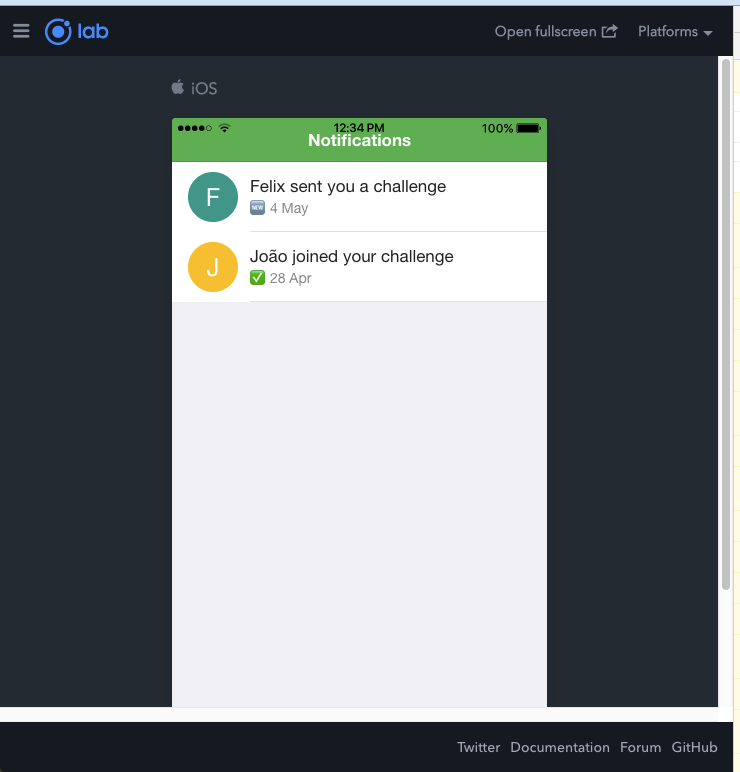
I think these are the main changes from old to new:
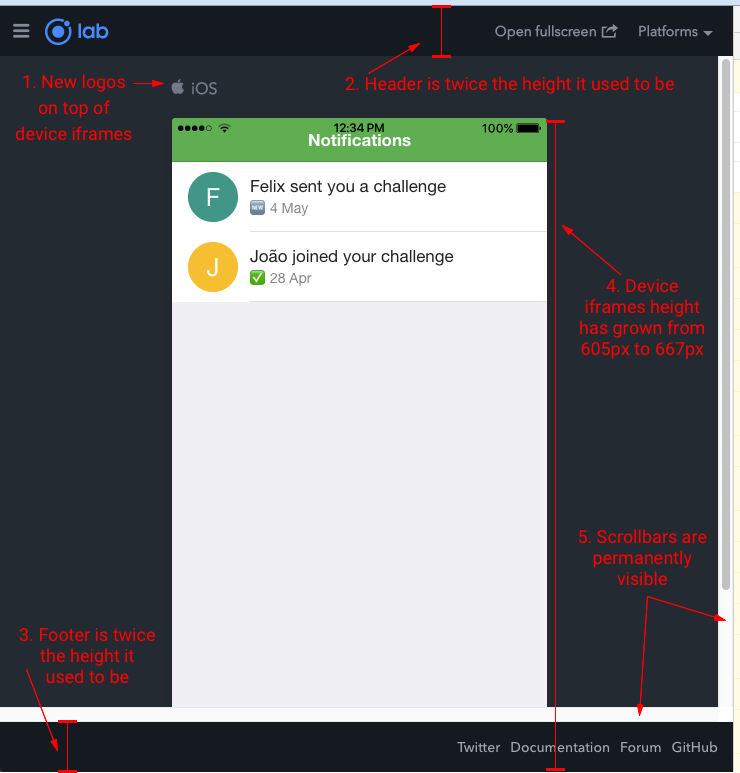
As said, in my opinion scrolling is not desirable here. Because my app (within the device iframes) scrolls as well. So, when I use a Magic Mouse (or any conventional mouse with a wheel) to scroll up and down, I just want my app to scroll. It's a bit frustrating when the entire Lab window alway scrolls up and down instead of just my app.
I hope I did a better job at explaining this time but let me know if not...
I think a setting like that could be a good solution! It would enable people with different screen sizes to develop and test without having to scroll up and down constantly.
I did try using the browser-inbuilt zoom function for this. But that gives some weird results, especially when compressing image assets.
imhoffd commentedon Oct 10, 2018
@bnfrnz Ah, thanks. You explained it well. Thank you 👌